 Send Us an Email



WordPress powers 43% of websites worldwide, but a huge number of them are technically “multilingual” and still feel… off.
Maybe you’ve seen it (or done it): you publish WordPress translation in a few languages, add a plugin, hit “publish,” and call it a day.
But then the user experience is rocky, the tone feels unnatural, the layout breaks in places, and the site still reads like it was translated, not truly translated and localized.
That’s because WordPress localization is bigger than swapping words. A properly localized WordPress website needs a real localization process that covers SEO, design, plugins, and cultural accuracy so the site feels natural to local users and search engines understand the content in the right context.
In other words, plugins can help with WordPress translation, but without WordPress localization, your site can still feel foreign and your results can show it.
The Hidden Risks of Poor WordPress Localization for Your Global Brand
Many global brands translate text and assume they’re ready for international markets. But on WordPress, that shortcut can create problems that are easy to miss during launch and painfully obvious to users the moment they land on your site.
Here’s what poor localization often looks like in real life:
- Themes and plugins still show English labels because not all interface elements are translated, especially system-generated text strings like buttons, error messages, cookie banners, and checkout confirmations. One missing string can break the user experience instantly.
- Translating plugins without checking the full site flow can leave gaps in navigation, menus, and forms so users get a mixed-language journey that feels unreliable.
- Incorrect formats (units of measure, currencies, dates, phone numbers) don’t just look messy; they raise credibility questions. If the pricing format feels “foreign,” users hesitate.
- Layout failures happen fast when you ignore left-to-right and right-to-left layouts (LTR/RTL). Languages like Arabic and Farsi need RTL support across typography, spacing, icons, and alignment; otherwise pages break, CTAs shift, and key content becomes harder to scan.
To put the impact into numbers, CSA Research found that 76% of shoppers prefer to buy products when the information is in their native language, and 40% won’t buy at all if the website isn’t in their language.
That’s why poor localization isn’t just a UX issue; it can directly affect conversions, trust, and revenue.
How to Localize Your WordPress Site the Right Way
1. Start with a strategy
Defining your target markets gives you clear goals and helps you understand what local users expect.
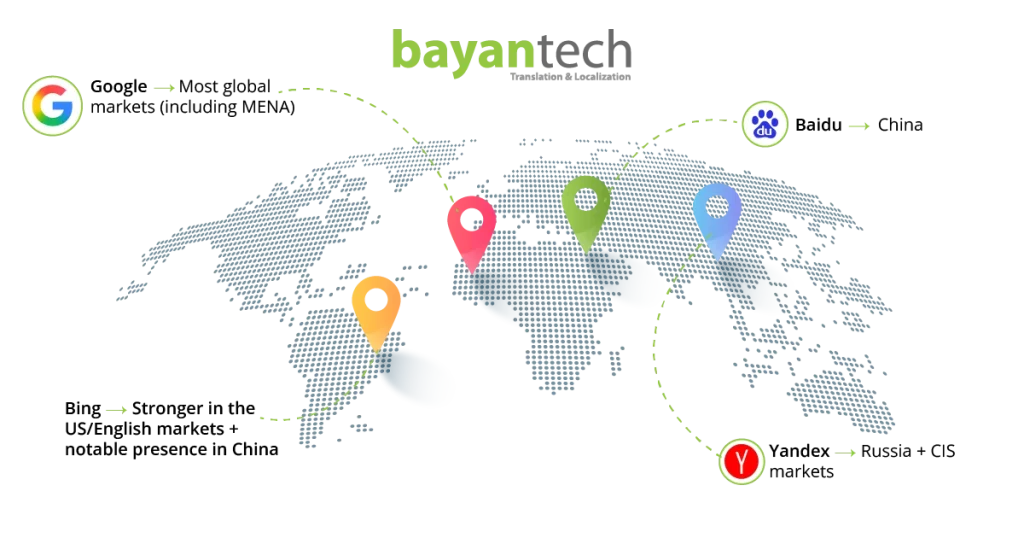
It also helps you set SEO priorities by language, because not every market relies on the same search engines, or searches the same way.
2. Follow a structured localization + translation process
Start by extracting your content, then run it through machine translation, ideally managed by a localization vendor through their LMS and tools, so they can build a reusable term base for your brand. Next, culturally localize
he translated text so the experience feels truly local as users navigate your site.
Machine translation is an important part of website localization, but the real risk is publishing it with zero human review. Partnering with a vendor that includes revision by native linguists helps turn awkward, literal output into natural, culturally aligned language.
Also, don’t forget to localize media, URLs, and slugs; they’re key for a smooth user journey, stronger visibility, and better retention.
3. Localize WordPress technical elements
Don’t leave the technical side in English while only translating pages. Make sure your themes and plugins are fully localized, including the small UI pieces that users interact with daily (buttons, alerts, checkout labels, cookie banners, etc.).
Also, watch out for hard-coded text strings that won’t change through a normal editor—these usually need PO/MO files or localization tools to translate properly.
And if you’re localizing into Arabic, don’t treat it like a simple language swap: your site needs full Right-to-Left support (layout, alignment, typography, and icons), not just translated words.
4. Optimize for user experience
Attention to detail makes you go a long way in building customer trust and user satisfaction. By adjusting units of measure, language tone, menus, and content flow, you ensure that localization didn’t end at the general interface of your website.
5. SEO for localized WordPress
A translated site won’t automatically rank in new markets unless the SEO is localized too. Start by setting up search-engine-friendly URL structures for each language, so both users and search engines can understand what each page is about.
Then focus on local keyword adaptation, not direct keyword translation—because people don’t search the same way in every market, even when they speak the same language. This is where native linguists make the difference: they choose the keywords that match real search intent, not just the dictionary meaning.
See our Website Translation Services Guide for best practices.
6. Continuous improvement
The #1 reason some brands see real results after localizing content—and others don’t—is continuity. The brands that win treat localization as a long-term partnership with language service providers, continuously testing and updating localized content to maintain quality.
Your linguistic reviewers should handle testing, QA, plugin updates, and periodic linguistic reviews for the best results. A one-time localization project rarely delivers lasting impact, so keep measuring, refining, and improving your localized content over time.
Tools & Best Practices for WordPress Localization Success
Think of WordPress localization as two tracks running in parallel: tech setup + language quality. If either one is weak, the site may be “translated” but it won’t feel translated and localized.
1) Start with the right tools (and use them correctly)
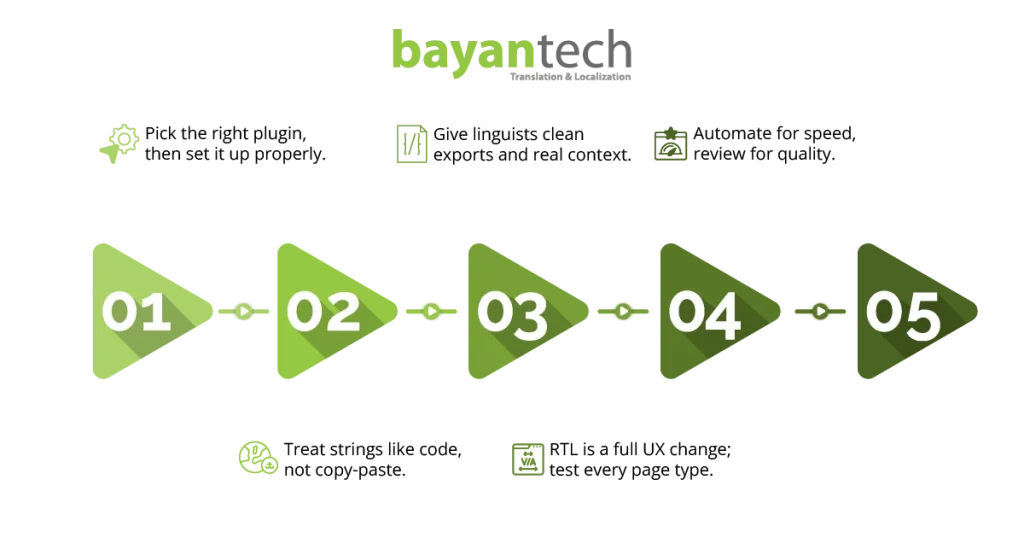
- Plugins like WPML, Polylang, or Weglot are great for managing multilingual structure, language switchers, and page relationships.
- The mistake is treating them as a “machine translation button.” Machine translation can speed things up, but without expert review, you’ll get awkward phrasing, inconsistent terminology, and missed context.
2) Manage your strings like a developer (not like a copy-paste project)
- WordPress is full of hidden content: text strings in themes, translating plugins, widgets, shortcodes, system messages, and pop-ups.
- Best practice is a structured export/import workflow so strings don’t get lost with updates, especially across child themes.
3) Make it localization-ready for linguists
- Export content in formats linguists can work with cleanly (like XLIFF) and keep context (screenshots, character limits, where the string appears). That’s how you prevent broken CTAs and weird UI labels.
4) Don’t “hope” RTL works—test it
- Supporting both Left-to-Right and Right-to-Left layouts is more than flipping alignment. It affects spacing, typography, icons, menus, and templates.
5) The winning formula: automation + expert review
A good translation service combines automation for speed with native linguists and QA for accuracy, so your WordPress site is truly localized, stable, and ready to scale.
How Brands Grow Faster with Proper WordPress Localization
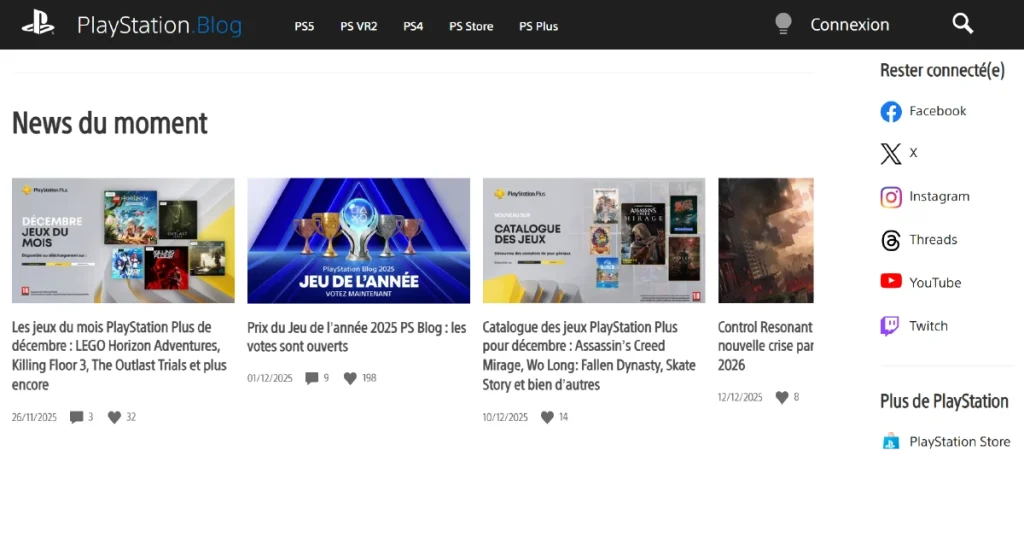
PlayStation.Blog is a great example of what “properly localized” looks like on WordPress. Instead of publishing one global site and relying on a plugin to translate everything, PlayStation creates dedicated regional versions—like the French PlayStation Blog—so the language, navigation, and content experience feel native to that audience.
This approach supports better SEO too, because search engines can clearly understand and rank the localized pages in the right market, rather than treating them as generic translations. The result is a site that doesn’t just translate text, but delivers a truly localized experience that matches local users’ expectations.
Build a Better Global Presence with Professional WordPress Localization
Start your WordPress localization process right by partnering with localization experts. bayantech builds partnerships with its clients, ensuring their business resonates in global markets with native and expert translation and localization.
Our services include adapting UX, SEO localization, and cultural adaptation for the target market, including dialects and cultural signifiers.
Contact us today to get a free consultation session with our experts, and launch your localized WordPress website in over 120 markets, all with the same seamless user experience.