

WordPress runs 43% of all web pages on the Internet, yet the vast majority of such sites are called “multilingual” and have issues with this aspect.
Have you ever seen this (or even tried it)? Published a WordPress translation in several languages, installed some plugins, pressed “publish,” and thought that the job was done.
However, when the user sees a website, it appears to be poorly designed, and the translation sounds awkward, which ruins the whole impression of the site as a multilingual resource.
The thing is that proper localization of a WordPress website requires an extensive process of making sure that your site is fully optimized linguistically, culturally, and SEO-wise.
To sum up, plugins will definitely aid you with WordPress translation, but without WordPress localization, the result can be far from perfect. Let’s see!
The Hidden Risks of Poor WordPress Localization for Your Global Brand
There are many global brands that translate their texts but fail to realize that there is still work to be done after this step. Specifically, in WordPress, that shortcut can create problems that are easy to miss during launch and painfully obvious to users the moment they land on your site.
Here’s what poor localization often looks like in real life:
- Themes and plugins are displayed in English, as some texts have not been translated yet, particularly those generated by the system, including button texts, error messages, cookie consent popups, and checkout confirmation texts. One missing string can break the user experience instantly.
- If you translate plugins without verifying the whole website’s workflow, you will miss some navigation elements, menus, and form fields, resulting in a mixed-language journey for users that feels unreliable.
- Incorrect data formats (units of measurement, currency, date, phone number) are not only looks unrelatable but also decrease credibility. For instance, if the pricing format looks “foreign,” people might doubt its accuracy and hesitate.
- Layout failures happen fast when you ignore left-to-right and right-to-left layouts (LTR/RTL). Languages like Arabic and Farsi need RTL support across typography, spacing, icons, and alignment. If ignored, your web page will fall apart and CTAs will shift.
CSA Research showed that 76% of customers would rather buy a product when the content is presented in their native language, while 40% will not even consider a purchase when the site is not localized.
Therefore, poor localization is not only a user experience problem but may actually have an effect on your conversion rate and sales revenue.
How to Localize Your WordPress Site the Right Way
1. Start with a strategy
Knowing your target markets means having well-defined objectives and knowing what the local users want.
It will also help you establish your SEO strategies according to each language since different markets don’t necessarily use the same search engines.
2. Implement a structured localization + translation workflow
Start by extracting your content, then run it through machine translation, ideally managed by a localization vendor through their LMS and tools, so they can build a reusable term base for your brand. Then, culturally localize the translated text to ensure a genuinely localized feel throughout the user journey.
Machine translation is crucial for website localization; the risk lies in deploying it without any human editing or revision at all. Working with a localization partner who provides revision by native linguists means turning unnatural, literal machine translations into more natural language.
Also, don’t forget to localize media, URLs, and slugs; they’re key for a smooth user journey, stronger visibility, and better retention.
3. Localize WordPress technical elements
Don’t leave the technical side in English while only translating pages. Make sure your themes and plugins are fully localized, including the small UI pieces that users interact with daily (buttons, alerts, checkout labels, cookie banners, etc.).
Moreover, always be mindful of hardcoded text strings that will not be translatable using an ordinary editor – they require PO/MO files or localization tools to translate properly.
Finally, if you are translating your website into Arabic, remember that this is more than just a translation; you also need to ensure full right-to-left compatibility (including layout, typography, iconography, and more).
4. Optimize for user experience
Attention to detail makes you go a long way in building customer trust and user satisfaction. By adjusting units of measure, language tone, menus, and content flow, you ensure that localization didn’t end at the general interface of your website.
5. SEO for localized WordPress
A translated site won’t automatically rank in new markets unless the SEO is localized too. Start by setting up search-engine-friendly URL structures for each language, so both users and search engines can understand what each page is about.
Then focus on local keyword adaptation, not direct keyword translation—because people don’t search the same way in every market, even when they speak the same language. This is where native linguists make the difference: they choose the keywords that match real search intent, not just the dictionary meaning.
See our Website Translation Services Guide for best practices.
6. Continuous improvement
The #1 reason some brands see real results after localizing content—and others don’t—is continuity. The brands that win treat localization as a long-term partnership with language service providers, continuously testing and updating localized content to maintain quality.
Your linguistic reviewers should handle testing, QA, plugin updates, and periodic linguistic reviews for the best results. A one-time localization project rarely delivers lasting impact, so keep measuring, refining, and improving your localized content over time.
Tools & Best Practices for WordPress Localization Success
Think of WordPress localization as two tracks running in parallel: tech setup + language quality. If either one is weak, the site may be “translated” but it won’t feel translated and localized.
1) Start with the right tools (and use them correctly)
WordPress plugins such as WPML, Polylang, and Weglot are perfect for multilingual website structures, language switchers, and page connections.
However, you shouldn’t think of them as a “machine translation button.” While machine translation might be faster, without a human expert reviewing it, you end up with odd phrases and missing contexts.
2) Manage your strings like a developer (not like a copy-paste project)
WordPress hides many pieces of content, including text strings in themes, translation plugins, widgets, shortcodes, system messages, and popups.
It’s best to export and import strings systematically to avoid losing any strings during updates, especially for child themes.
3) Make it localization-ready for linguists
- Export content in formats linguists can work with cleanly (like XLIFF) and keep context (screenshots, character limits, where the string appears). That’s how you prevent broken CTAs and weird UI labels.
4) Don’t “hope” RTL works—test it
- Supporting both Left-to-Right and Right-to-Left layouts is more than flipping alignment. It affects spacing, typography, icons, menus, and templates.
5) The winning formula: automation + expert review
A good translation service combines automation for speed with native linguists and QA for accuracy, so your WordPress site is truly localized, stable, and ready to scale.
How Brands Grow Faster with Proper WordPress Localization
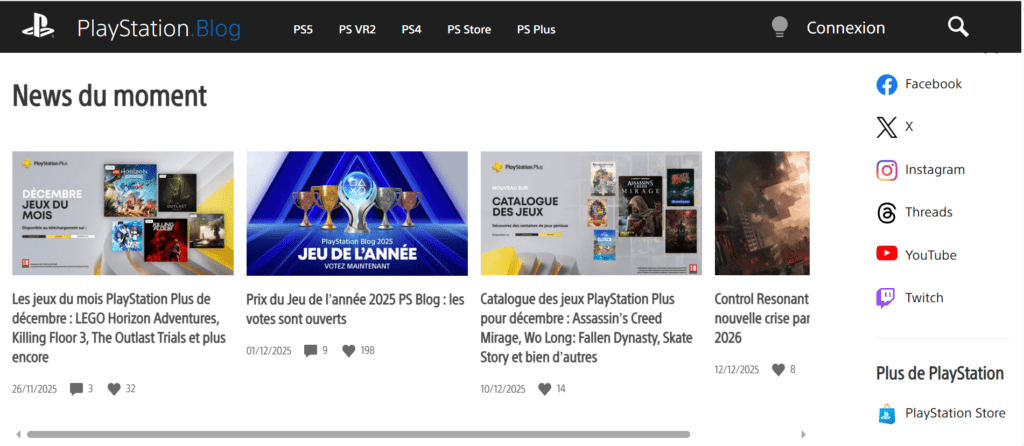
An excellent example of properly localized web design is the PlayStation.Blog page. Rather than have one globally designed website where a plugin would perform all the translations, PlayStation creates separate regions, such as the French PlayStation Blog. This way, the whole page, from its navigation to its contents, feels natural for the users.
Not only does such localization help with the website’s SEO, but it allows the search engines to recognize and categorize the site’s localized pages in the proper market. This way, the site goes beyond merely translating its texts; it provides a truly localized user experience.
Build a Better Global Presence with Professional WordPress Localization
Take the first step towards WordPress localization by working with localization professionals. bayantech creates business relationships with its clients and ensures that the clients’ businesses are well-received in international markets with professional translation and localization.
We offer UX localization, SEO localization, and culture adaptation to fit the target market.
Get in touch with us now for a free consultation session with our localization experts and get started on creating your localized WordPress website in more than 120 markets with the same ease of use.